Floral Indigo Wedding Invitation Graphic Design Guide
Elevating wedding stationery requires a balance of artistic elegance and technical precision. The Floral Indigo Wedding Invitation Graphic offers a sophisticated solution for designers and couples seeking a distinctive aesthetic that moves beyond generic templates. This resource centers on hand-drawn watercolor illustrations rendered in deep indigo tones, providing a moody yet romantic alternative to traditional pastels. For professionals and DIY creators alike, understanding the practical application of this specific graphic pack is essential for producing high-quality print and digital assets efficiently.
Leveraging Hand-Drawn Watercolor Aesthetics
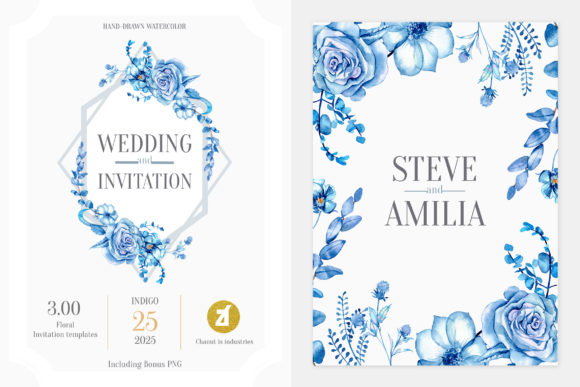
The primary value of the Floral Indigo collection lies in its authentic, hand-drawn watercolor style. In an era dominated by vector art and AI-generated imagery, genuine brushwork carries a tangible warmth that resonates with clients seeking organic sophistication. The indigo palette specifically addresses a gap in the market; while blush and sage green are ubiquitous, deep blue florals offer a striking contrast that photographs beautifully and reads clearly on both cream and white cardstock.
For graphic designers, this aesthetic solves a common communication challenge: conveying luxury without relying on metallic foils or expensive embellishments. The depth of color in these illustrations creates visual hierarchy naturally. When designing an invitation suite, the darker indigo elements can serve as anchors for typography, guiding the reader’s eye through essential details like dates and venues. This functional beauty ensures the design is not only visually appealing but also highly legible, which is a critical metric for successful event stationery.
Maximizing Workflow with Isolated PNG Assets
Efficiency is often the difference between a profitable project and a time sink. This pack includes 11 isolated PNG files, which are arguably the most immediately useful assets for rapid production. Because these floral elements come with transparent backgrounds, they eliminate the tedious process of masking or extracting subjects from complex layers. This feature is particularly valuable for marketers and small business owners creating social media teasers, website banners, or digital save-the-dates where speed is paramount.
Consider a scenario where a freelance designer needs to create three different layout variations for a client presentation within a tight deadline. Using the isolated PNGs allows for instant drag-and-drop composition. You can test vertical versus horizontal arrangements, adjust opacity for subtle watermark effects, or layer elements behind text without degrading image quality. This flexibility supports iterative design processes, enabling creators to explore multiple concepts quickly before committing to final vector edits. However, users should note that while PNGs are excellent for digital use and quick mockups, they have fixed resolutions. Always verify the DPI matches your print requirements before sending files to production.
Professional Customization via Vector and Layered Files
While raster images offer speed, professional deliverables demand scalability and editability. The inclusion of AI, EPS, and PSD files transforms this product from a simple clip-art set into a comprehensive design foundation. These source files cater to advanced users who need to modify colors, scale graphics for large-format signage, or integrate the florals into complex branding systems.
Adobe Illustrator (AI) and EPS Files: These vector-based formats are indispensable for print production. Unlike raster images, vectors can be scaled infinitely without pixelation. This is crucial when adapting a wedding invitation motif for larger applications such as welcome signs, seating charts, or menu cards. Designers can also adjust the color values directly within Illustrator to match specific Pantone swatches or coordinate with other brand elements. If a client requests a shift from indigo to navy or teal, the vector files allow for global color changes in seconds, preserving the integrity of the original hand-drawn lines.
Photoshop (PSD) Files: The layered PSD serves as a master template for those who prefer pixel-based editing or need to apply texture overlays. Smart objects and organized layer groups streamline the customization process. For educators teaching stationery design or content creators building tutorials, the PSD provides a clear structural example of how to compose floral layouts professionally. It allows users to toggle visibility, adjust blending modes, and apply non-destructive filters, making it an ideal learning tool and production asset simultaneously.
Strategic Applications Across Different Media
The versatility of the Floral Indigo Wedding Invitation Graphic extends far beyond standard 5x7 invitations. Understanding cross-media application helps users maximize their return on investment. The cohesive nature of the hand-drawn illustrations ensures brand consistency across various touchpoints, which is vital for modern weddings where physical and digital experiences must align.
- Digital Stationery: Use high-resolution PNGs for email invitations and mobile-optimized RSVP pages. The indigo tones maintain vibrancy on screens where lighter colors sometimes wash out.
- Print Collateral: Utilize vector files for thank-you cards, place cards, and ceremony programs. The ability to scale individual flowers allows for creating borders, corners, or centerpieces appropriate for different paper sizes.
- Social Media Content: Bloggers and influencers can use the JPEG previews and PNGs to create Pinterest pins or Instagram stories. The distinct colorway performs well in feeds saturated with bright whites and pinks, potentially increasing engagement rates.
- Merchandise and Signage: Entrepreneurs selling wedding-related products can adapt the EPS files for acrylic signs, napkins, or tote bags. The clean line work translates effectively to laser cutting and embroidery digitizing.
Evaluating Fit and Technical Considerations
Despite its versatility, the Floral Indigo collection is not a universal solution. Honest assessment of fit prevents wasted effort. The moody, saturated color profile may clash with ultra-bright, airy wedding themes or neon color palettes. Designers working with clients who prefer minimalist, typographic-only aesthetics might find the detailed watercolor style too ornate. It is best suited for romantic, vintage, bohemian, or evening-formal events where depth and texture are desired.
Technical compatibility is another practical consideration. While the pack covers industry-standard formats, users must ensure their software versions support the files. Older versions of Adobe Creative Cloud may struggle with newer AI file features. Additionally, color management is critical when working with indigo. Deep blues are notorious for shifting during CMYK conversion for print. Professionals should always request a physical proof from their printer to verify that the rich indigo tones reproduce accurately on the chosen paper stock. Uncoated papers tend to absorb ink, potentially muting the vibrancy, while coated stocks preserve saturation but may alter the perceived texture of the watercolor effect.
Enhancing Client Communication and Decision Making
Beyond technical specs, this graphic pack serves as a communication tool. For wedding planners and designers, presenting pre-made, high-quality floral options can simplify decision fatigue for couples. Instead of describing abstract concepts, showing concrete examples using the Floral Indigo assets helps clients articulate their preferences. "Do you like this level of detail?" or "Is this shade of blue too dark?" are easier questions to answer than "What kind of flowers do you want?"
This tangibility accelerates the approval cycle. When clients see professional-grade compositions early in the process, trust increases. They understand the potential outcome before custom work begins. For freelancers, this means fewer revisions and clearer scope boundaries. The JPEG preview files included in the pack are specifically designed for this purpose—allowing quick sharing via email or messaging apps without transferring massive source files prematurely.
Ultimately, the Floral Indigo Wedding Invitation Graphic represents a strategic asset rather than mere decoration. By combining authentic artistry with robust file architecture, it supports diverse workflows from rapid digital content creation to meticulous print production. Success depends on matching the resource to appropriate projects and leveraging each file type according to its strengths. When applied thoughtfully, these tools enable creators to deliver exceptional results that balance artistic vision with commercial viability, saving time while elevating the final presentation.